> ## Documentation Index
> Fetch the complete documentation index at: https://docs.totebot.ai/llms.txt
> Use this file to discover all available pages before exploring further.
# Analytics
> Track performance and optimize results
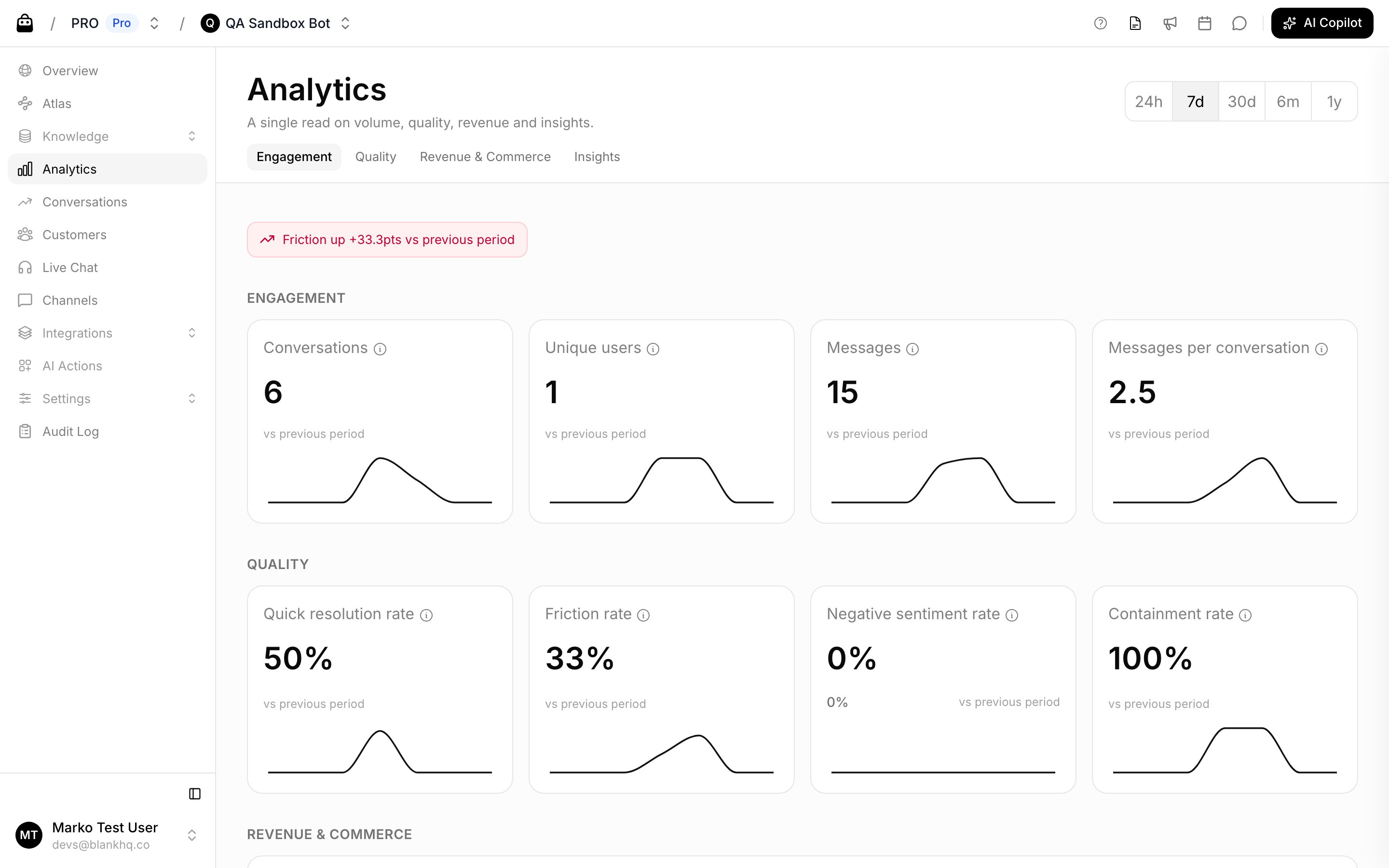
The Analytics section becomes essential once your Totebot is live. It gives you a single read on volume, quality, revenue, and insights on one scrolling page. A sticky header at the top lets you jump between sections and set the date range.
 ## Engagement
Volume metrics for the selected period:
* **Conversations**: total conversations.
* **Unique users**: number of individual users who interacted with the agent.
* **Messages**: total messages exchanged.
* **Messages per conversation**: average conversation length.
## Quality
How well the agent handles conversations on its own:
* **Quick resolution rate**: share of conversations resolved in a few messages.
* **Friction rate**: share of conversations where users showed signs of frustration.
* **Negative sentiment rate**: share of conversations with negative sentiment.
* **Containment rate**: share of conversations the agent handled without human help.
## Revenue & Commerce
If a Shopify or WooCommerce store is connected, this section shows the agent's business impact:
* **Products added to cart**: products added after an AI-assisted interaction.
* **Checkout starts**: checkouts initiated through the agent. (This does not equal completed purchases.)
* **Revenue generated**: total revenue attributed to purchases initiated through Totebot conversations, with a daily breakdown.
## Insights
## Engagement
Volume metrics for the selected period:
* **Conversations**: total conversations.
* **Unique users**: number of individual users who interacted with the agent.
* **Messages**: total messages exchanged.
* **Messages per conversation**: average conversation length.
## Quality
How well the agent handles conversations on its own:
* **Quick resolution rate**: share of conversations resolved in a few messages.
* **Friction rate**: share of conversations where users showed signs of frustration.
* **Negative sentiment rate**: share of conversations with negative sentiment.
* **Containment rate**: share of conversations the agent handled without human help.
## Revenue & Commerce
If a Shopify or WooCommerce store is connected, this section shows the agent's business impact:
* **Products added to cart**: products added after an AI-assisted interaction.
* **Checkout starts**: checkouts initiated through the agent. (This does not equal completed purchases.)
* **Revenue generated**: total revenue attributed to purchases initiated through Totebot conversations, with a daily breakdown.
## Insights
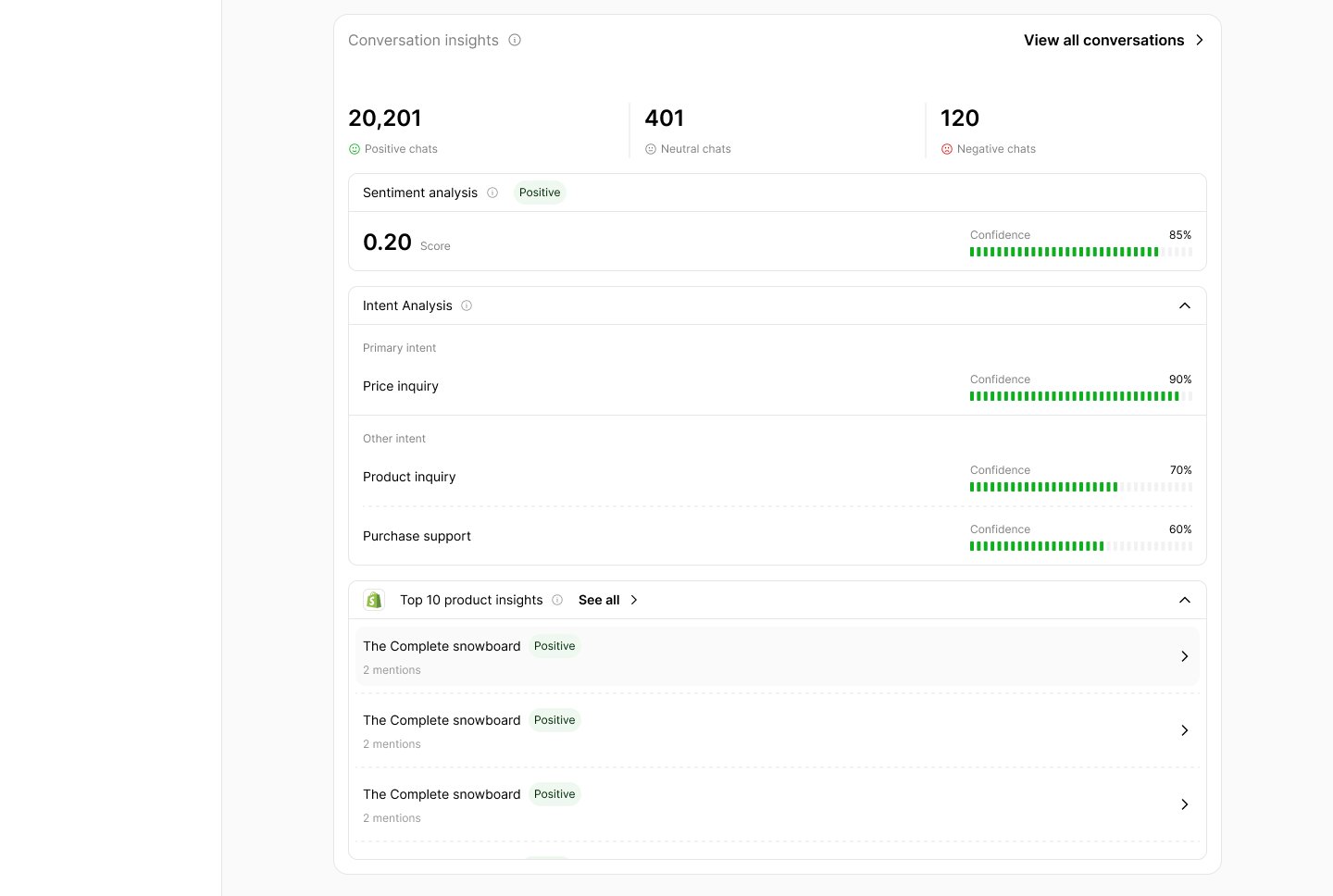 * **Sentiment analysis**: the emotional tone behind user messages.
* **Intent analysis**: the core purpose behind each conversation (product inquiry, pricing, support), with a confidence score.
* **Top questions**: common customer questions grouped by similarity.
* **Product insights**: the products mentioned most frequently in conversations, with sentiment and context.
This section also shows **Suggested messages**, so you can see how often your quick-start suggestions were used.
Insights are available on the **Pro** and **Scale** plans.
## Knowledge gaps
On the **Pro** and **Scale** plans, the Analytics header shows a knowledge-gap count that links to a dedicated **Gaps** page. It lists questions your agent couldn't answer well, so you can turn recurring ones into knowledge sources or Q\&A pairs.
* **Sentiment analysis**: the emotional tone behind user messages.
* **Intent analysis**: the core purpose behind each conversation (product inquiry, pricing, support), with a confidence score.
* **Top questions**: common customer questions grouped by similarity.
* **Product insights**: the products mentioned most frequently in conversations, with sentiment and context.
This section also shows **Suggested messages**, so you can see how often your quick-start suggestions were used.
Insights are available on the **Pro** and **Scale** plans.
## Knowledge gaps
On the **Pro** and **Scale** plans, the Analytics header shows a knowledge-gap count that links to a dedicated **Gaps** page. It lists questions your agent couldn't answer well, so you can turn recurring ones into knowledge sources or Q\&A pairs.